How to clean ban traces properly
First Step is to make sure game is on default location on C drive, that's the directory the cleaner cleans :
C:\Program Files\Epic Games\Fortnite\FortniteGame\
Restart your PC after a ban in a game!
Visit the Dashboard, proceed to login if not done already and visit the Loader tab from the tabs in the left side of the dashboard and click on "Download" as seen below.

Once downloaded, open the Loader and wait a little.
This can take a long time or short time, all depending on your connection.
The Loader tab page will refresh with the client options as seen below.
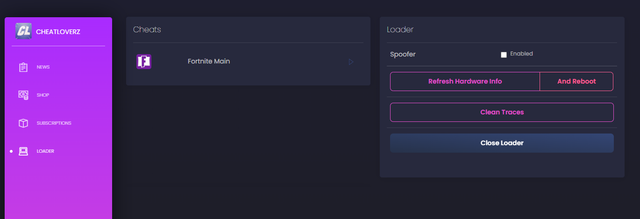
Click on "Clean Traces", please wait for this to finish with a green success message at the top of the site. (if you get a failure message, pleasespoof clean error
Click on the "refresh hardware info / And reboot" button, this will refresh hardware information and reset network adapters then restart your PC.
if internet connection didnt come back automaticly, then go to: Device manager > network adapter > scan for hardware changes > then right click on the network adapter with the yellow mark > choose update driver > browse > let me pick > choose one of the drivers from the list ( one of them will work if the other didnt ) > done.
Reboot your pc, Now you clean and you can spoof and cheat again !